Monitor de tráfico de red
Monitor de tráfico de red is a network monitoring tool that shows you a real-time world map of where your apps send data. It identifies the organizations behind IP addresses, such as Google, Meta, and Microsoft, helping you audit your device's security. The app is lightweight, with a simple interface, but currently has no user ratings and only 1+ installs. It is designed for users who want to understand and control their network connections.
Pros
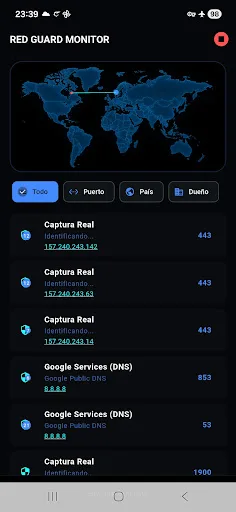
- Visual global map with animated arcs showing data destinations
- Identifies organizations behind IPs (Google, Meta, etc.)
- Real-time monitoring of app network activity
- Helps audit security and privacy of device connections
- Lightweight tool with minimal battery usage
Cons
- No user ratings yet, so reliability is unverified
- Very low install count (1+) may indicate limited testing
- Last update date unknown, so may lack recent improvements
Monitor de tráfico de red Screenshots
Official app screenshots from the Google Play Store.
About Monitor de tráfico de red
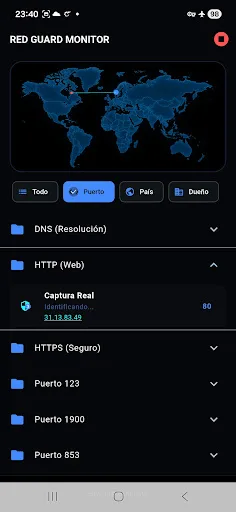
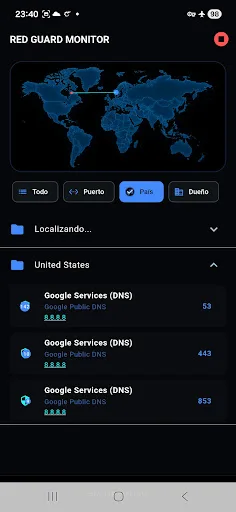
Have you ever wondered where in the world your mobile apps are sending data to? Red Guard Pro is the ultimate tactical tool for auditing the security and network traffic of your Android device in real time. Key Features: • Global Connection Map: Visually see, with an elegant world map and animated arcs, where the servers your phone communicates with are located. • Organization Identification: Discover who the real owner is behind each IP address. Identify connections to Google, Meta (Facebook/WhatsApp), Microsoft, Amazon, and thousands more providers. • Application Monitoring: Thanks to our advanced local tunneling engine, you can know exactly which application (Chrome, Instagram, system apps, etc.) is generating each connection. • Service and Port Dictionary: Learn what each detected port is for (HTTPS, DNS, WhatsApp, etc.) with our integrated manual and understand its risk level. • Smart Grouping: Organize your connections by Port, Country, or Organization to detect usage patterns or unusual behavior. • IP Forensics: Get in-depth technical details like the city, ISP (Internet Service Provider), and ASN (Associated Network Number) of each destination with a single tap.…
Frequently Asked Questions
Is this app safe to use?
Since it has no ratings and very few installs, its safety is not well-established. However, it only monitors network traffic and does not require root access, but always download from the Play Store and review permissions.
Does the app contain ads?
The Play Store listing does not mention ads. Given its low install count, it likely has no ads, but this could change with updates.
Can I use it offline?
No, the app requires an internet connection to monitor live traffic and map server locations. It is not designed for offline use.
Who should install this app?
Privacy-conscious users, security auditors, or anyone curious about where their apps send data. It's a niche tool for those who want deep visibility into network connections.