SubTracker - サブスクトラッカー
SubTracker - サブスクトラッカー is a straightforward subscription management tool that helps you track all your recurring payments in one place. It supports both monthly and annual billing cycles, displays total monthly costs on the home screen, and shows next billing dates with remaining days. The app uses color-coded categories for easy organization. Ideal for anyone juggling multiple subscriptions like Netflix, Spotify, or Amazon Prime.
Pros
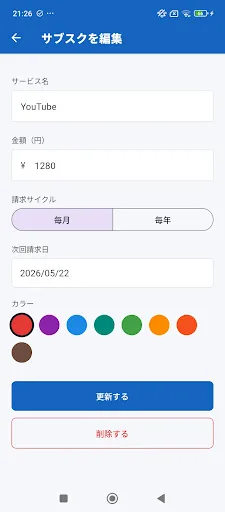
- Simple and intuitive interface for adding, editing, and deleting subscriptions
- Supports both monthly and annual payment frequencies
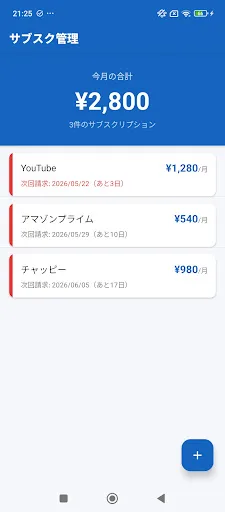
- Home screen displays total monthly spending at a glance
- Shows next billing date and remaining days for each subscription
- Color-coded management makes it easy to differentiate services
Cons
- No cloud backup or sync across devices
- Limited to basic tracking features without advanced analytics or reports
- Currently only available in Japanese language
SubTracker - サブスクトラッカー Screenshots
Official app screenshots from the Google Play Store.
About SubTracker - サブスクトラッカー
"I wonder how much I'm paying every month..." Subscription Tracker is a simple app that centrally manages all your subscription services. [Main Features] • Register, edit, and delete subscriptions • Supports both monthly and annual payments • Easily see your total monthly amount on the home screen • Displays the next billing date and remaining days • Easy-to-understand color-coded management [Recommended for:] • Those who subscribe to multiple services such as Netflix, Spotify, and Amazon Prime • Those who want to track and save on monthly fixed expenses • Those who tend to forget service renewal dates Its simple operation makes it an opportunity to review unnecessary subscriptions.
Frequently Asked Questions
Is SubTracker safe to use?
Yes, SubTracker is safe. It does not require any sensitive permissions and stores all your subscription data locally on your device. No personal or payment information is transmitted to external servers.
Does SubTracker contain ads?
The app is ad-free, providing an uninterrupted experience for managing your subscriptions.
Can I use SubTracker offline?
Yes, SubTracker works fully offline since all data is stored locally on your device. No internet connection is required to add, view, or edit your subscriptions.
Who should install SubTracker?
This app is ideal for anyone who subscribes to multiple services (e.g., Netflix, Spotify, Amazon Prime) and wants a simple, no-frills way to track monthly expenses and avoid forgotten renewals. It's also great for users who prefer a minimalistic, offline-first tool.